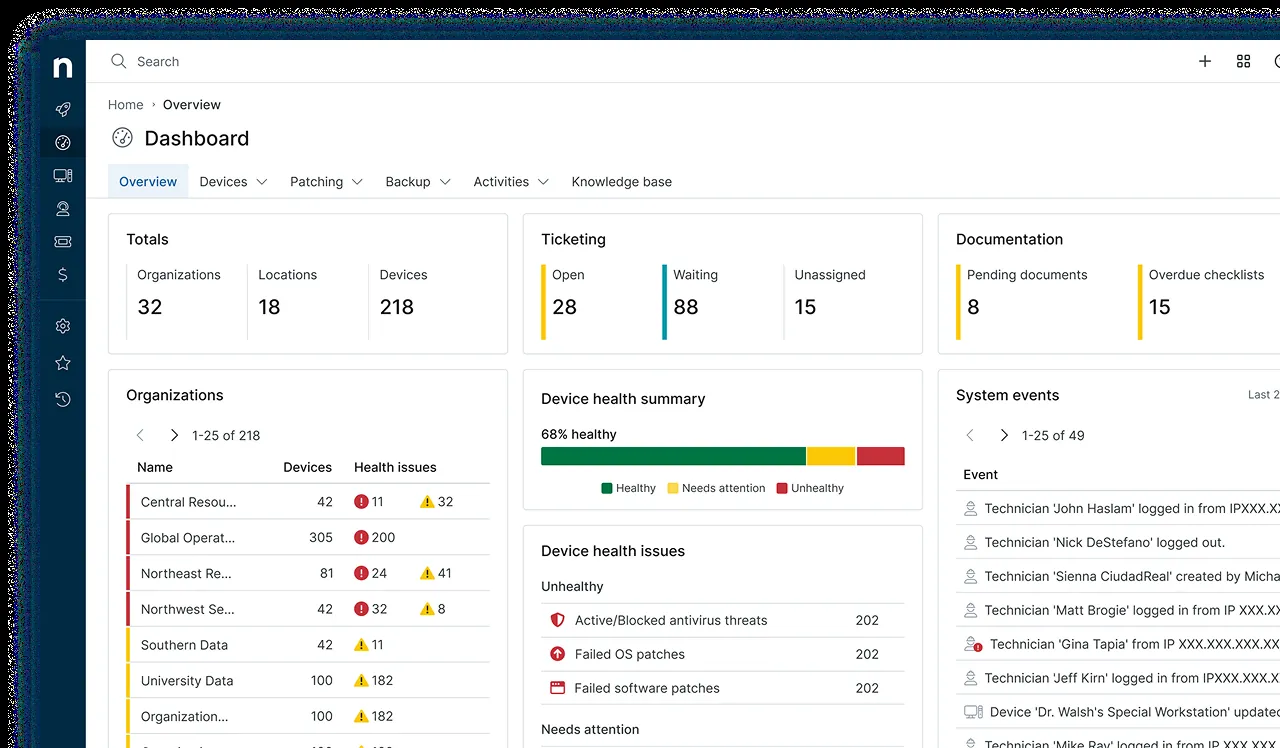
NinjaOne comes up whenever admins talk about RMM tools that actually feel good to use. It is a cloud-based unified endpoint management and remote monitoring platform, made by NinjaOne, and its reputation rests largely on the thing most IT software gets wrong: the interface. If you have spent years fighting clunky, cluttered management consoles, the honest appeal of NinjaOne is that someone clearly thought about the person staring at the screen all day. It is a commercial product with per-endpoint, quote-based pricing, and it is aimed at teams that want serious capability without a steep operational learning curve.
What NinjaOne actually does
NinjaOne pulls the core endpoint-management jobs into one cloud console. You deploy a lightweight agent to each device, and from there you monitor health, receive alerts, and act on problems across your whole fleet from a browser.
The feature set is broad. Patch management handles operating systems and third-party applications. Remote access lets a technician connect to a machine to troubleshoot. There is software deployment for rolling out or updating applications, backup capabilities for protecting endpoint data, and automation to take routine tasks off your plate. Monitoring covers servers, workstations, and network devices, with alerting when thresholds are crossed. It is designed as the single pane of glass for keeping an estate patched, monitored, backed up, and supported.
Where it shines
The interface is the standout, and it is not a superficial point. A console that is fast to navigate and easy to read means less time hunting for the right screen and fewer mistakes under pressure. Teams onboarding new technicians tend to get them productive faster than with older platforms.
Breadth done well. NinjaOne covers monitoring, patching, remote access, software deployment, and backup without those features feeling bolted on. For a team that wants one capable tool rather than a patchwork, that coherence matters.
Reliability and support get consistently good marks from the people who run it daily. Patching in particular — the unglamorous chore that quietly protects you — is one of the things NinjaOne is repeatedly praised for handling cleanly.
Where it falls short
Pricing is quote-based, which is the honest friction point. There is no simple published price you can plug into a spreadsheet; you talk to sales and get a number based on your endpoint count and needs. That is normal for this tier of product, but it makes quick comparison harder and can feel opaque if you just want a figure.
It is priced per endpoint, so the economics differ from per-technician tools. If you manage a very high number of devices with a tiny team, a per-technician competitor may work out cheaper — worth checking before you settle.
It is not the lightest or cheapest option. If your needs are modest — you mainly want to keep a small number of machines patched — NinjaOne may be more platform than the situation calls for.
Who it’s for
NinjaOne fits internal IT teams and MSPs that want a genuinely capable, unified RMM and want the daily experience of using it to be pleasant and fast. If you value a modern interface, solid patching, and a broad feature set in one console, and per-endpoint pricing suits your device-to-tech ratio, it is one of the strongest picks in the category.
Look elsewhere if you need a hard published price before you will even trial something, if a per-technician model fits your team far better economically, or if your requirements are small enough that a focused, cheaper tool would do.
Licensing and cost
NinjaOne is commercial, subscription software with quote-based pricing that generally scales per endpoint. You evaluate it through a trial arranged via the vendor, and you get pricing by requesting a quote rather than reading it off a page. Because plans and figures change and depend on your environment, confirm current terms directly with NinjaOne rather than trusting numbers quoted elsewhere.
How it compares
Atera is the value-first alternative, priced per technician with unlimited devices and with ticketing and billing built in. If your endpoint-per-technician ratio is high, Atera can be much cheaper; NinjaOne generally answers with more endpoint-management depth and a more refined console. It is a classic price-versus-polish decision.
Syncro leans harder into the MSP business side — integrated ticketing, billing, and invoicing on a per-technician model. Choose Syncro if running the commercial side of an MSP is central to your day; choose NinjaOne if the priority is best-in-class endpoint management.
Action1 is the narrower, patch-focused option with a free tier for a small fleet. If patching and basic remote monitoring are all you actually need, it is a lighter and cheaper starting point than a full unified platform.
Getting it safely
NinjaOne is a cloud platform, so you begin with a trial or account on NinjaOne’s own official site (ninjaone.com) rather than downloading a product from a third party. We are an independent review portal — we host nothing, mirror nothing, and distribute no installers. The only file that reaches your machines is the endpoint agent, and you should install only the one issued from inside your own NinjaOne console. Before rolling it out, take a moment with our short guide on how to verify a download so you can be sure the installer is the real thing.
FAQ
Why can’t I just see NinjaOne’s price? Because it is quote-based. Pricing depends on your endpoint count and the features you need, so you request a quote rather than reading a fixed number. It is standard at this tier, though it does make instant comparison harder.
Is NinjaOne overkill for a handful of machines? It can be. NinjaOne is built to manage estates well, and if you only need to patch a few computers, a lighter and cheaper focused tool may serve you better. It earns its keep as the number and variety of endpoints grows.
How is it different from a per-technician tool like Atera or Syncro? NinjaOne prices per endpoint and emphasises depth of endpoint management, while per-technician tools charge by seat with unlimited devices and often foreground MSP ticketing and billing. The right choice comes down to your device-to-technician ratio and whether business/PSA features matter to you.
Where to get it
NinjaOne is available directly from NinjaOne. This is an independent catalog — we don't sell or host the software. See plans and start a trial on the official site: ninjaone.com →.
same segment