rmm
Lansweeper
IT asset discovery and inventory across networks, devices and software.
Overview
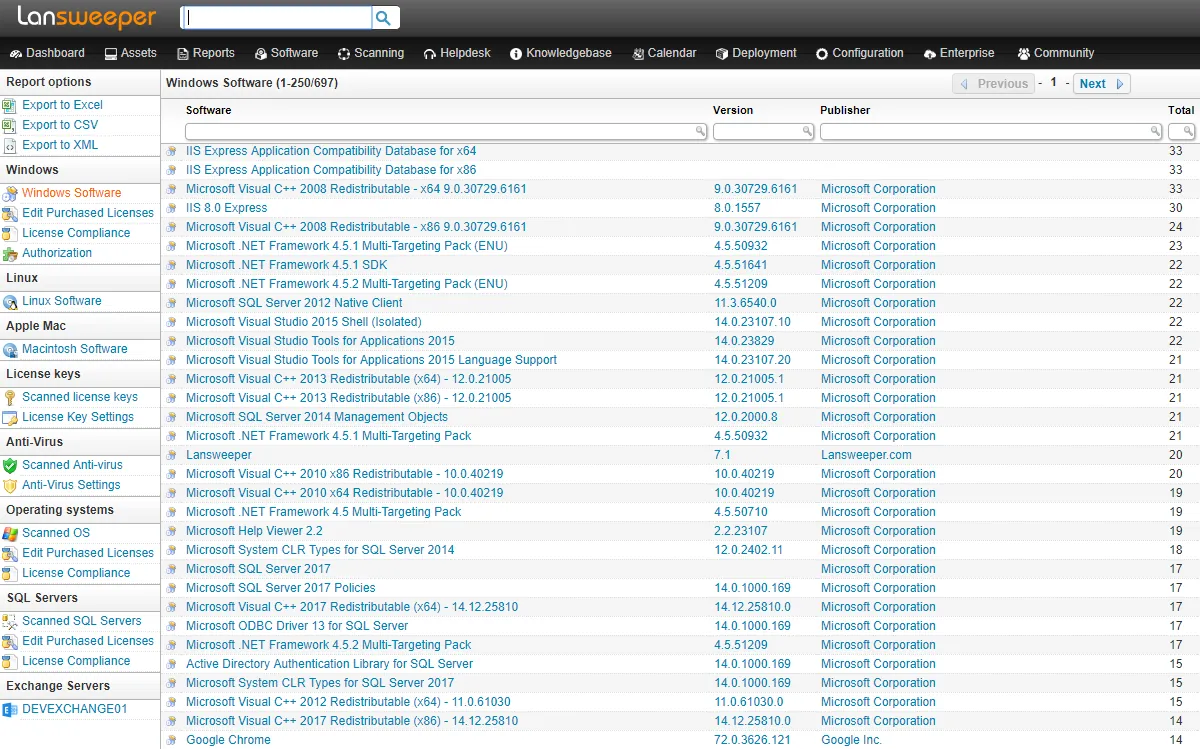
Lansweeper is an IT asset discovery and inventory platform developed by Lansweeper. It is designed to scan networks and automatically build a detailed inventory of connected hardware, installed software, and associated users, giving IT teams visibility into what is actually present in their environment. Rather than focusing on real-time remote control, Lansweeper’s primary purpose is asset discovery, inventory management, and reporting, which supports use cases such as license compliance, hardware lifecycle planning, and security auditing.
Lansweeper is a trademark of its owner. This entry is an independent, factual summary and does not imply any affiliation, endorsement, or partnership between Lansweeper and this catalog.
Key capabilities
Lansweeper combines agentless network scanning with optional agent-based deployment, giving administrators flexibility in how devices are discovered and kept up to date.
Key features include:
- Agentless scanning of networks to detect connected devices without requiring software installation on every endpoint
- Optional lightweight agents for continuous, agent-based inventory updates on individual machines
- Credential-based deep scanning that authenticates to devices to retrieve detailed hardware and software data
- Inventory of hardware specifications, installed software, operating system details, and logged-in or associated users
- Discovery of a broad range of network-connected asset types beyond traditional computers, such as printers and network equipment
- Reporting tools for generating asset summaries, compliance views, and custom queries
- Integrations with configuration management databases (CMDB) and IT service management (ITSM) systems to feed asset data into broader workflows
Because scanning can be agentless, Lansweeper is often used to get visibility into devices where installing a persistent agent is impractical, while credential-based scans provide deeper detail where access is available.
Typical use cases
Lansweeper is typically used by IT and security teams that need an accurate, up-to-date record of what hardware and software exists across their network. Common scenarios include software license auditing, hardware refresh and lifecycle planning, vulnerability and security assessments that rely on knowing what is deployed, and feeding asset data into a CMDB or ITSM platform for broader IT operations. It is also used simply to answer the basic question of what devices and software are present on a network, which can be difficult to track manually as environments grow.
Licensing and pricing
Lansweeper is commercial software offered with both a free tier and a trial for evaluating paid features. Paid subscriptions are generally scaled by the number of assets being scanned and managed, meaning cost typically increases with the size of the inventoried environment. Specific plan tiers, the scope of the free tier, and current pricing are determined by the vendor and can change, so the official Lansweeper website should be consulted for up-to-date details before committing to a plan.
Platform support
Lansweeper can be deployed on Windows as an on-premises installation, or used as a cloud-hosted service, depending on the deployment option chosen. Regardless of deployment method, the platform is capable of discovering and inventorying assets across mixed environments, including devices running different operating systems, network hardware, and other connected equipment, not just Windows systems.
Getting started
Lansweeper’s software is obtained from the vendor’s official website, and using the platform requires setting up an account or on-premises installation; this catalog does not host installers or distribute the software directly. New users typically begin with the free tier or trial, configure network scanning (agentless, agent-based, or both), and provide credentials for deeper asset detail where needed. From there, inventory reports and integrations with CMDB or ITSM tools can be configured. For current features, deployment options, and pricing, refer to Lansweeper’s official website at lansweeper.com.
Where to download
Downloads are hosted by Lansweeper on their official website. The button below opens that site — we never host installers.
same segment