network scanners
SoftPerfect Network Scanner
IPv4/IPv6 scanner for device discovery, shared resource enumeration and reporting.
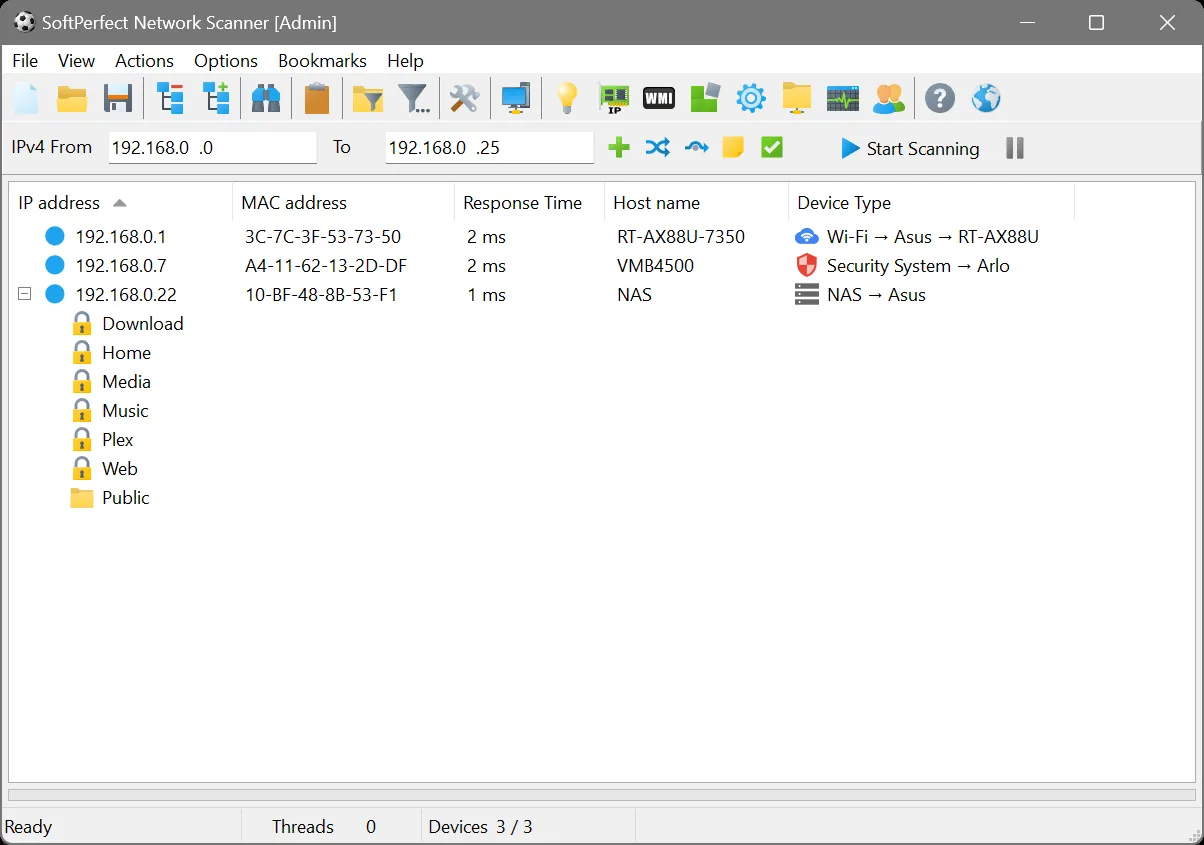
Use with authorization only. Scan networks and hosts you own or have explicit written permission to assess. Unauthorized scanning can violate acceptable-use policies and, in some jurisdictions, the law.
Overview
SoftPerfect Network Scanner is a network discovery and administration utility developed by SoftPerfect. It scans IPv4 and IPv6 ranges to identify active devices on a local network, retrieving details such as MAC addresses, hostnames, and shared resources. The tool is aimed at network administrators and IT support staff who need a quick inventory or diagnostic view of the devices connected to a segment, along with the services and shares those devices expose.
The application is proprietary software distributed by SoftPerfect. Both a free version and a paid, licensed edition are available, with the paid tier intended for users who require extended functionality or commercial deployment. Prospective users should consult the vendor’s official product page for the current feature comparison between the free and licensed editions.
Key capabilities
SoftPerfect Network Scanner performs a range of discovery and diagnostic functions in a single interface:
- Pings devices across a specified IPv4 or IPv6 range and reports which hosts respond, along with response times.
- Resolves and displays MAC addresses and hostnames for discovered devices, aiding in device identification.
- Enumerates shared folders and network resources exposed by scanned hosts, allowing quick review of what is accessible on the network.
- Checks the status of specified TCP ports on target hosts, which can help identify open services during routine audits.
- Supports sending Wake-on-LAN packets to power on compatible remote machines.
- Can execute remote commands and perform basic remote shutdown or similar administrative actions on supported systems, subject to appropriate permissions.
- Exports scan results into report formats suitable for documentation or further review, and allows saving/loading of scan configurations.
Typical use cases
Administrators commonly use SoftPerfect Network Scanner to build a quick inventory of devices on a LAN, verify that expected hosts are online, and confirm which shared folders are reachable before performing maintenance. IT support teams may use it to troubleshoot connectivity issues, confirm that wake-on-LAN is functioning for scheduled remote power-on tasks, or audit which ports are open on internal servers and workstations as part of routine housekeeping. Because it surfaces shared resources directly, it is also used to review file-sharing exposure within an internal network before making configuration changes.
As with any active scanning tool, it should only be run against networks and hosts the user owns or has explicit authorization to assess. Scanning networks without permission may violate acceptable-use policies or applicable law.
Licensing and pricing
SoftPerfect Network Scanner is proprietary software. A free version is offered for general use, while a separate licensed version is available for purchase, typically providing additional capabilities or licensing terms suited to organizational use. This catalog does not publish specific prices, since licensing terms and cost can change; check the vendor’s official website for current pricing and edition details before purchasing.
Platform support
The application runs on Windows. Refer to the vendor’s system requirements on their official site for details on supported Windows versions.
Getting started
SoftPerfect Network Scanner is obtained from the vendor’s official website at https://www.softperfect.com/products/networkscanner/. This catalog entry does not host installers or distribute the software directly; downloads should always be taken from SoftPerfect’s own site to ensure authenticity. After installation, review the application’s documentation for guidance on configuring scan ranges, enabling optional features such as remote command execution, and understanding which permissions are required for full functionality on your network.
Where to download
Downloads are hosted by SoftPerfect on their official website. The button below opens that site — we never host installers.
same segment
Alternatives in Network Scanners
Open-source network discovery and security auditing tool with a powerful scripting engine.
by Nmap ProjectOpen-source packet analyzer for network troubleshooting, analysis and protocol inspection.
by Wireshark FoundationLightweight, cross-platform open-source IP address and port scanner.
by Anton Keks