network scanners
Wireshark
Open-source packet analyzer for network troubleshooting, analysis and protocol inspection.
Use with authorization only. Scan networks and hosts you own or have explicit written permission to assess. Unauthorized scanning can violate acceptable-use policies and, in some jurisdictions, the law.
Overview
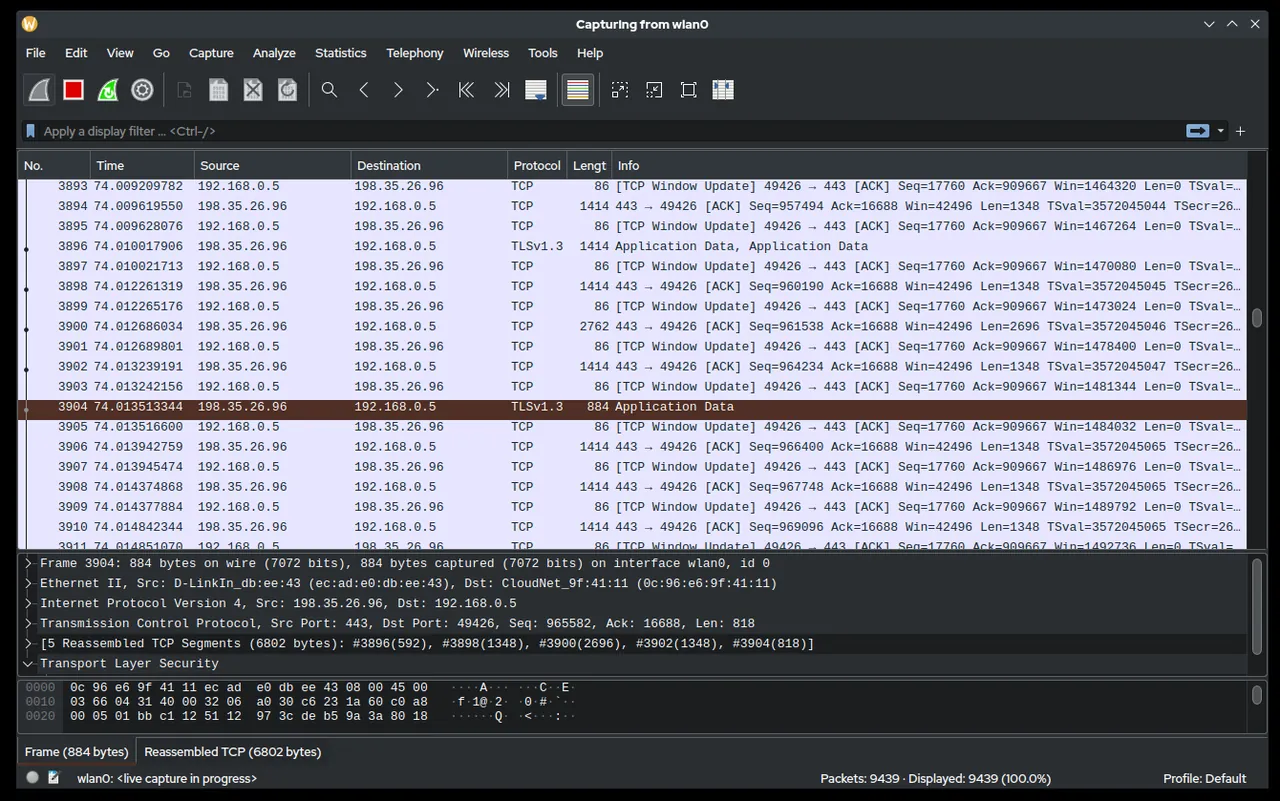
Wireshark is an open-source packet analyzer maintained by the Wireshark Foundation. It is used to capture network traffic and inspect it at the protocol level, making it a common reference tool in network troubleshooting, protocol education, and security analysis. Wireshark presents captured data through a graphical interface that decodes traffic into its constituent protocol layers, and it also includes a command-line companion, tshark, for scripted or headless use.
Key capabilities
Wireshark can capture traffic live from a selected network interface or read previously saved capture files for offline analysis. Its dissection engine supports deep inspection of a large number of network protocols, breaking each packet down into its individual fields so users can examine headers, payloads, and protocol-specific details. To help narrow down large capture sets, Wireshark provides two filtering mechanisms: capture filters, based on Berkeley Packet Filter (BPF) syntax, which limit what is captured at collection time, and display filters, a more expressive syntax used to search and filter packets already captured.
A frequently used feature is the ability to follow a TCP, UDP, or HTTP stream, which reconstructs the sequence of packets exchanged during a single conversation into a readable format. This is useful for reviewing application-layer exchanges, such as HTTP requests and responses, without manually correlating individual packets. Statistics tools within Wireshark can summarize traffic by protocol, conversation, or endpoint. The included tshark utility exposes much of the same capture and dissection functionality from the command line, which is useful for automation and remote or resource-constrained environments.
Typical use cases
Wireshark is used by network administrators to diagnose connectivity and performance problems by observing traffic directly rather than relying on higher-level symptoms. Security practitioners use it to inspect suspicious traffic during authorized investigations or to verify that applications are communicating as expected. Developers use it to debug network-facing applications and confirm that protocol implementations behave correctly. Educators and students use it to study how network protocols operate in practice. As with any traffic-capture tool, it should only be used on networks and systems you own or are explicitly authorized to monitor; capturing traffic on networks without authorization may violate privacy laws and organizational policies.
Licensing and pricing
Wireshark is open-source software distributed under the GNU General Public License version 2 (GPLv2). It is free to download, use, and modify in accordance with the terms of that license.
Platform support
Wireshark is cross-platform and available for Windows, macOS, and Linux. Installers are provided for Windows and macOS, and Linux users can typically install it through their distribution’s package manager or from source.
Getting started
Wireshark should be downloaded only from its official website, wireshark.org, or from a trusted operating system package repository. This catalog does not host installers and does not distribute the software directly. After installation, capturing live traffic generally requires elevated privileges or specific capture permissions, depending on the operating system; consult the official documentation for platform-specific setup steps. Only capture traffic on networks and devices you own or have explicit authorization to monitor.
Guides
Where to download
Downloads are hosted by Wireshark Foundation on their official website. The button below opens that site — we never host installers.
same segment
Alternatives in Network Scanners
Open-source network discovery and security auditing tool with a powerful scripting engine.
by Nmap ProjectLightweight, cross-platform open-source IP address and port scanner.
by Anton KeksFree Windows LAN scanner for device discovery, shared folders and remote access.
by Famatech