network scanners
Angry IP Scanner
Lightweight, cross-platform open-source IP address and port scanner.
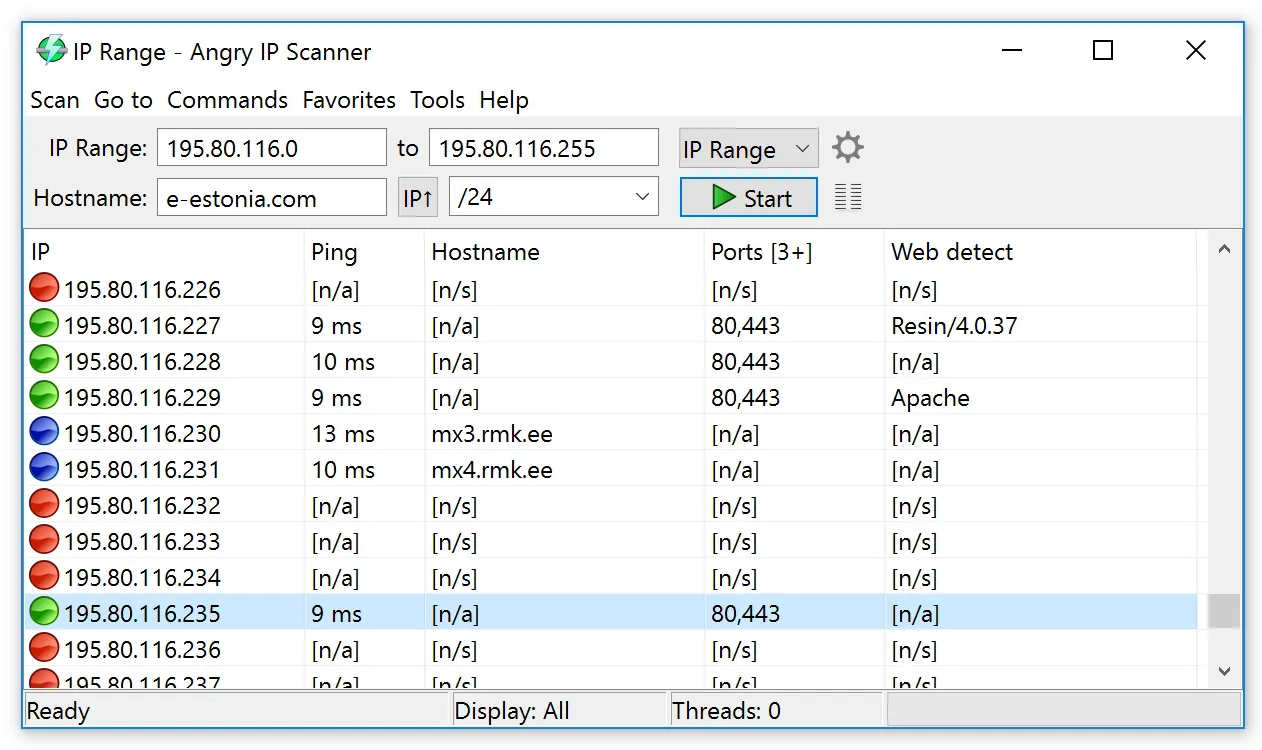
Use with authorization only. Scan networks and hosts you own or have explicit written permission to assess. Unauthorized scanning can violate acceptable-use policies and, in some jurisdictions, the law.
Overview
Angry IP Scanner is an open-source IP address and port scanner developed by Anton Keks. It is built to scan network ranges quickly, identifying which hosts are active and gathering basic information about each one. Because it is written in Java, it runs on multiple operating systems from a single codebase, and it has a reputation among administrators for being a lightweight, no-frills tool focused on speed rather than a broad feature set.
Key capabilities
Angry IP Scanner works by pinging each IP address within a specified range to determine whether a host is alive, then optionally resolving its hostname, retrieving its MAC address, and scanning for open ports. Results are displayed in a simple table that can be sorted and filtered, making it straightforward to identify active devices on a subnet. The tool supports exporting scan results to several formats, including CSV, TXT, and XML, which allows the data to be reused in spreadsheets, reports, or other tools.
Angry IP Scanner is extensible through a system of fetchers and plugins, which let users add extra data columns or additional scanning behavior beyond the default set of checks. This plugin architecture makes it possible to tailor the tool for specific inventory or diagnostic needs without modifying the core application. Because it does not require installation in some configurations, it is also commonly used as a portable utility.
Typical use cases
Angry IP Scanner is commonly used for quick network inventory tasks, such as identifying which devices are currently connected to a local network, confirming that expected hosts are reachable, or spotting unfamiliar devices on a subnet. It is also used to verify open ports on a range of hosts and to export a snapshot of network state for documentation or troubleshooting purposes. Scanning should only be performed on networks you own or have explicit authorization to assess, since scanning networks without permission can violate acceptable-use policies and, in some jurisdictions, the law.
Licensing and pricing
Angry IP Scanner is open-source software distributed under the GNU General Public License version 2 (GPLv2). It is free to download and use in accordance with the terms of that license.
Platform support
Because it is Java-based, Angry IP Scanner is cross-platform and runs on Windows, macOS, and Linux, provided a compatible Java runtime is available (in most distributions this is bundled with the installer).
Getting started
Angry IP Scanner should be downloaded only from its official website, angryip.org. This catalog does not host installers and does not distribute the software directly. The official site provides platform-specific packages as well as a portable version that does not require installation. Before scanning any network, confirm that you own it or have explicit authorization to assess it.
How it compares
Angry IP Scanner occupies a middle ground between minimal command-line utilities and full network-management suites. Compared with command-driven scanners such as Nmap, it trades depth of detail and scripting flexibility for a graphical interface and a gentle learning curve, which makes it approachable for quick inventories and ad-hoc checks. Compared with Windows-only freeware like Advanced IP Scanner, its main distinction is cross-platform support, since the same Java-based application runs on Windows, macOS, and Linux. It is best understood as a fast, lightweight discovery tool rather than a continuous monitoring or asset-management platform: it answers “what is currently on this subnet and which ports respond” rather than tracking devices, configuration, or performance over time. Teams that need historical data, alerting, or long-term inventory typically pair it with a dedicated monitoring system.
Where to download
Downloads are hosted by Anton Keks on their official website. The button below opens that site — we never host installers.
same segment
Alternatives in Network Scanners
Open-source network discovery and security auditing tool with a powerful scripting engine.
by Nmap ProjectOpen-source packet analyzer for network troubleshooting, analysis and protocol inspection.
by Wireshark FoundationFree Windows LAN scanner for device discovery, shared folders and remote access.
by Famatech