network scanners
Advanced Port Scanner
Free Windows port scanner for finding open ports and identifying services on a network.
Use with authorization only. Scan networks and hosts you own or have explicit written permission to assess. Unauthorized scanning can violate acceptable-use policies and, in some jurisdictions, the law.
Overview
Advanced Port Scanner is a network utility developed by Famatech for quickly identifying open TCP ports on hosts within a network. It is designed to be lightweight and fast, giving administrators a straightforward way to see which ports are open on a range of addresses and what services appear to be running behind them. “Advanced Port Scanner” is a trademark of Famatech.
The application is freeware, meaning it is provided by the vendor at no cost, and runs on Windows. A portable version is also available, allowing the tool to be run without a full installation, which is useful for technicians who need to carry diagnostic tools between machines.
Key capabilities
Advanced Port Scanner is built around fast, straightforward port scanning and the practical follow-up actions administrators typically need:
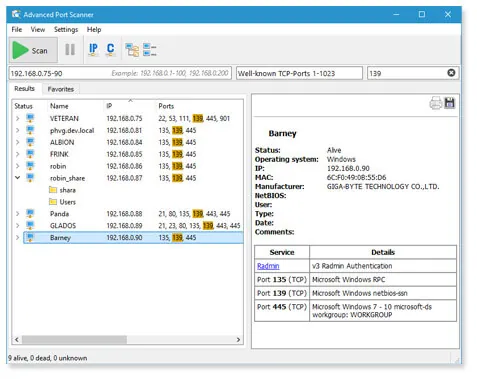
- Scans specified IP ranges to find open TCP ports on each host, reporting results as the scan progresses.
- Attempts to identify the program or service associated with each open port, helping to characterize what is running on a given host.
- Provides quick access to discovered resources, including the ability to connect directly to detected HTTP, HTTPS, and FTP resources from within the tool.
- Offers remote access options for hosts where appropriate remote administration services are detected and accessible.
- Supports exporting or reviewing scan results for documentation and follow-up.
- Is available as a portable build that does not require installation, in addition to the standard installable version.
Typical use cases
Administrators use Advanced Port Scanner to perform quick audits of which ports are open across a subnet, verify that only expected services are exposed, and troubleshoot connectivity to network resources such as internal web servers or FTP shares. The portable version is often used by field technicians who need a fast diagnostic tool on removable media without installing software on client machines. It is also used as a first pass before deeper analysis with more specialized security tools.
This tool performs active scanning of network hosts, and it should only be used against networks and systems you own or have explicit authorization to test. Scanning third-party networks without permission may be unlawful or violate applicable terms of service.
Licensing and pricing
Advanced Port Scanner is freeware, distributed by Famatech at no cost to end users. As a proprietary application, its features and licensing terms are set by the vendor and may change; check Famatech’s official website for the current license terms before deploying it in an organizational setting.
Platform support
The application runs on Windows, with both a standard installer and a portable, installation-free version available.
Getting started
Advanced Port Scanner is downloaded from the vendor’s official website at https://www.advanced-port-scanner.com. This catalog does not host installers or distribute the software directly; always obtain the program from Famatech’s official site to ensure you are running an authentic, unmodified build. Users can choose between the standard installer or the portable version depending on whether they need a persistent installation or a tool that can run directly from removable media.
Where to download
Downloads are hosted by Famatech on their official website. The button below opens that site — we never host installers.
same segment
Alternatives in Network Scanners
Open-source network discovery and security auditing tool with a powerful scripting engine.
by Nmap ProjectOpen-source packet analyzer for network troubleshooting, analysis and protocol inspection.
by Wireshark FoundationLightweight, cross-platform open-source IP address and port scanner.
by Anton Keks